




When you’re choosing a browser automation framework, the internet is full of opinions but short on hard data. Selenium is the veteran with years of battle testing. Playwright is the modern challenger with native async support and speed promises. But which one actually performs better in production?
Most benchmarks test on simple static pages or “hello world” scenarios. That tells you nothing about real-world performance when dealing with dynamic DOM updates, complex user interactions, and production-grade websites. To get meaningful answers, I built TypeForge Bench – a FastAPI application that runs both frameworks through identical tests on monkeytype.com, measuring WPM, accuracy, browser startup time, CPU usage, and memory consumption.
The results show no universal winner. Playwright starts browsers 15% faster and scales vertically through async I/O. Selenium scales horizontally with lower per-process overhead. Both achieve 100% accuracy. The right choice depends on your infrastructure and scaling requirements. Let me show you the data.
Why Monkeytype.com?
Testing browser automation on a static HTML page proves nothing. I needed a real production website with actual complexity:
• Dynamic DOM updates – Every typed character triggers real-time DOM manipulation. Monkeytype wraps each letter in custom <letter> tags with individual styling and state tracking.
• Cookie modals – Standard GDPR compliance popup that must be handled before interaction.
• Complex keyboard event handling – The site validates typing speed, detects mistakes, and updates multiple UI components simultaneously.
• JavaScript-heavy rendering – Results don’t exist in HTML; they’re calculated and injected by client-side code.
Monkeytype is a perfect stress test because it mimics what you’ll face in production: sites that rely on JavaScript, update the DOM constantly, and require precise user interaction simulation.
Building a Fair Benchmark
The entire project runs as a Docker Compose stack with three services:
• FastAPI application – Orchestrates test execution and stores results
• PostgreSQL database – Persists session data and benchmark results
• Selenium standalone-chrome – Remote WebDriver endpoint for Selenium tests
Both Selenium and Playwright implement the same TypingDriver abstract interface:
    class TypingDriver(ABC):
        @abstractmethod
        async def run(self, profile: TypingProfileType) -> TypingResult:
            ...
This ensures both drivers execute identical workflows:
1. Start browser (timed)
2. Navigate to monkeytype.com
3. Dismiss cookie modal if present
4. Take a “before” screenshot
5. Extract text from DOM
6. Type character-by-character with profile-specific delays
7. Extract WPM and accuracy from the results page
8. Take an “after” screenshot
9. Return metrics
The only variable is the framework itself. Same parsing logic, same data models, same resource monitoring. This eliminates every variable except the one we’re testing.
From Human to Robot
To validate framework behavior under different load conditions, the benchmark includes four typing profiles:
| Profile | Delay Between Keys | Expected WPM |
| beginner | 200ms | 30-40 WPM |
| intermediate | 100ms | 100-120 WPM |
| expert | 50ms | 180-220 WPM |
| robot | 0ms | 300+ WPM |
This range covers everything from slow human typing to maximum-speed automation stress tests. The intermediate profile serves as the baseline for comparison since it closely matches average human typing speed.
The Text Extraction Challenge
Monkeytype’s DOM structure presents an interesting parsing challenge. Instead of storing text in a single element, it uses a nested structure:
    <div id="words">
      <div class="word">
        <letter>h</letter>
        <letter>e</letter>
        <letter>l</letter>
        <letter>l</letter>
        <letter>o</letter>
      </div>
      <div class="word">
        <letter>w</letter>
        <letter>o</letter>
        <letter>r</letter>
        <letter>l</letter>
        <letter>d</letter>
      </div>
    </div>
1. Find the #words container
2. Query all .word elements
3. For each word, extract all <letter> tags
4. Join letters into words, then join words with spaces
The difference is in implementation. Selenium uses synchronous calls:
def _extract_text_from_words(self, driver: WebDriver) -> str:
        words_container = driver.find_element(By.ID, "words")
        words = words_container.find_elements(By.CSS_SELECTOR, ".word")

        text_parts = []
        for word_elem in words:
            letters = word_elem.find_elements(By.TAG_NAME, "letter")
            word_text = "".join(letter.text for letter in letters)
            text_parts.append(word_text)

        return " ".join(text_parts)
Playwright uses async/await:
 async def _extract_text_from_words(self, page: Page) -> str:
        await page.wait_for_selector("#words", state="visible")
        words = await page.query_selector_all("#words .word")

        text_parts = []
        for word_elem in words:
            letters = await word_elem.query_selector_all("letter")
            word_text = "".join([await letter.inner_text() for letter in letters])
            text_parts.append(word_text)

        return " ".join(text_parts)
Same logic, different execution models. This becomes important when we look at how each framework integrates with FastAPI.
Selenium Implementation: The Sync/Async Bridge
Selenium is fundamentally synchronous. This requires a different integration approach when working with FastAPI, which runs on an async event loop. Running synchronous Selenium code directly in an async function would block the entire event loop, preventing FastAPI from handling other requests.
The solution is ThreadPoolExecutor – run Selenium in a separate thread and await its completion:
  class SeleniumTypingDriver(TypingDriver):
        def __init__(self, screenshots_dir: Path | None = None):
            self.screenshots_dir = screenshots_dir or Path(settings.SCREENSHOTS_DIR)
            self._executor = ThreadPoolExecutor(max_workers=1)

        def _run_sync(self, profile: TypingProfileType, session_id: str) -> TypingResult:
            driver = None

            try:
                browser_start = time.time()
                driver = self._create_driver()
                browser_start_ms = (time.time() - browser_start) * 1000

                driver.get("https://monkeytype.com")

                # Wait for page load
                WebDriverWait(driver, 10).until(
                    EC.presence_of_element_located((By.ID, "words"))
                )

                # Dismiss cookie modal
                try:
                    cookie_modal = WebDriverWait(driver, 2).until(
                        EC.presence_of_element_located((By.CSS_SELECTOR, "#cookiesModal .acceptAll"))
                    )
                    cookie_modal.click()
                    time.sleep(0.5)
                except Exception:
                    pass

                screenshot_before = str(self.screenshots_dir / f"{session_id}_before.png")
                driver.save_screenshot(screenshot_before)

                text = self._extract_text_from_words(driver)

                # Click to focus
                driver.execute_script("document.body.click();")
                time.sleep(0.5)

                # Type with ActionChains
                from selenium.webdriver.common.action_chains import ActionChains
                actions = ActionChains(driver)

                base_delay = self._get_profile_delay(profile)

                for i, char in enumerate(text):
                    actions.send_keys(char)
                    if base_delay > 0:
                        actions.pause(base_delay)

                    # Batch every 10 keystrokes for performance
                    if i % 10 == 9:
                        actions.perform()
                        actions = ActionChains(driver)

                actions.perform()

                # Extract results
                wpm, accuracy = self._get_results(driver)

                screenshot_after = str(self.screenshots_dir / f"{session_id}_after.png")
                driver.save_screenshot(screenshot_after)

                return TypingResult(
                    wpm=wpm,
                    accuracy=accuracy,
                    browser_start_ms=browser_start_ms,
                    screenshot_before=screenshot_before,
                    screenshot_after=screenshot_after,
                )

            finally:
                if driver:
                    driver.quit()

        async def run(self, profile: TypingProfileType) -> TypingResult:
            session_id = str(uuid.uuid4())

            loop = asyncio.get_event_loop()
            result = await loop.run_in_executor(
                self._executor,
                self._run_sync,
                profile,
                session_id
            )

            return result
Key implementation details:
1. ActionChains batching – Selenium’s ActionChains builder pattern requires calling .perform() to execute. Batching every 10 characters reduces overhead compared to performing after each keystroke.
2. Remote WebDriver – Selenium connects to a standalone Chrome container running at http://selenium:4444/wd/hub. This keeps the browser isolated from the application container.
3. ThreadPoolExecutor isolation – Each test runs in its own thread, preventing FastAPI’s event loop from being blocked.
Playwright Implementation: Native Async All the Way
Playwright was designed for async from the ground up. The implementation is significantly cleaner:
class PlaywrightTypingDriver(TypingDriver):
        def __init__(self, screenshots_dir: Path | None = None):
            self.screenshots_dir = screenshots_dir or Path(settings.SCREENSHOTS_DIR)

        async def run(self, profile: TypingProfileType) -> TypingResult:
            session_id = str(uuid.uuid4())

            browser: Browser | None = None

            try:
                browser_start = time.time()

                async with async_playwright() as p:
                    browser = await p.chromium.launch(
                        headless=True,
                        args=[
                            "--disable-blink-features=AutomationControlled",
                            "--no-sandbox",
                            "--disable-dev-shm-usage"
                        ]
                    )

                    browser_start_ms = (time.time() - browser_start) * 1000

                    page = await browser.new_page(
                        viewport={"width": 1920, "height": 1080}
                    )

                    await page.goto("https://monkeytype.com", wait_until="networkidle")
                    await page.wait_for_selector("#words", state="visible")

                    # Dismiss cookie modal
                    try:
                        await page.click("#cookiesModal .acceptAll", timeout=2000)
                        await asyncio.sleep(0.5)
                    except Exception:
                        pass

                    screenshot_before = str(self.screenshots_dir / f"{session_id}_before.png")
                    await page.screenshot(path=screenshot_before)

                    text = await self._extract_text_from_words(page)

                    await page.evaluate("document.body.click();")
                    await asyncio.sleep(0.3)

                    # Type with native delay support
                    base_delay_ms = self._get_profile_delay_ms(profile)
                    await page.keyboard.type(text, delay=base_delay_ms)

                    wpm, accuracy = await self._get_results(page)

                    screenshot_after = str(self.screenshots_dir / f"{session_id}_after.png")
                    await page.screenshot(path=screenshot_after)

                    await browser.close()

                    return TypingResult(
                        wpm=wpm,
                        accuracy=accuracy,
                        browser_start_ms=browser_start_ms,
                        screenshot_before=screenshot_before,
                        screenshot_after=screenshot_after,
                    )

            except Exception:
                if browser:
                    await browser.close()
                raise
Key advantages:
1. Native async – No ThreadPoolExecutor needed, integrates directly with FastAPI’s event loop
2. Context managers – async with async_playwright() handles resource cleanup automatically
3. Built-in typing delay – page.keyboard.type(text, delay=100) is simpler than ActionChains batching
4. Network idle – wait_until=”networkidle” ensures JavaScript execution completes before interaction
The Playwright code is shorter, more readable, and conceptually simpler. This is a legitimate advantage when building maintainable automation systems.
Resource Monitoring: Measuring What Matters
Both drivers use the same MetricsCollector to measure CPU and memory usage during test execution:
 class MetricsCollector:
        def __init__(self):
            self._process = psutil.Process()
            self._peak_memory: float = 0
            self._peak_cpu: float = 0
            self._running: bool = False

        async def _collect_loop(self) -> None:
            while self._running:
                mem_mb = self._process.memory_info().rss / 1024 / 1024
                cpu_percent = self._process.cpu_percent(interval=None)

                self._peak_memory = max(self._peak_memory, mem_mb)
                self._peak_cpu = max(self._peak_cpu, cpu_percent)

                await asyncio.sleep(0.1)

        def start(self) -> None:
            self._running = True
            self._task = asyncio.create_task(self._collect_loop())

        async def stop(self) -> Tuple[float, float]:
            self._running = False
            await self._task
            return self._peak_memory, self._peak_cpu
This collector runs in the background, sampling resource usage every 100ms and tracking peak values. It starts before browser initialization and stops after result extraction, capturing the entire lifecycle.
Important caveat: These metrics measure the Python process, not just the browser. This includes FastAPI overhead, SQLAlchemy connections, and other background tasks. The measurements are relative comparisons between identical test conditions, not absolute browser resource consumption.
The Benchmarks: Real Numbers
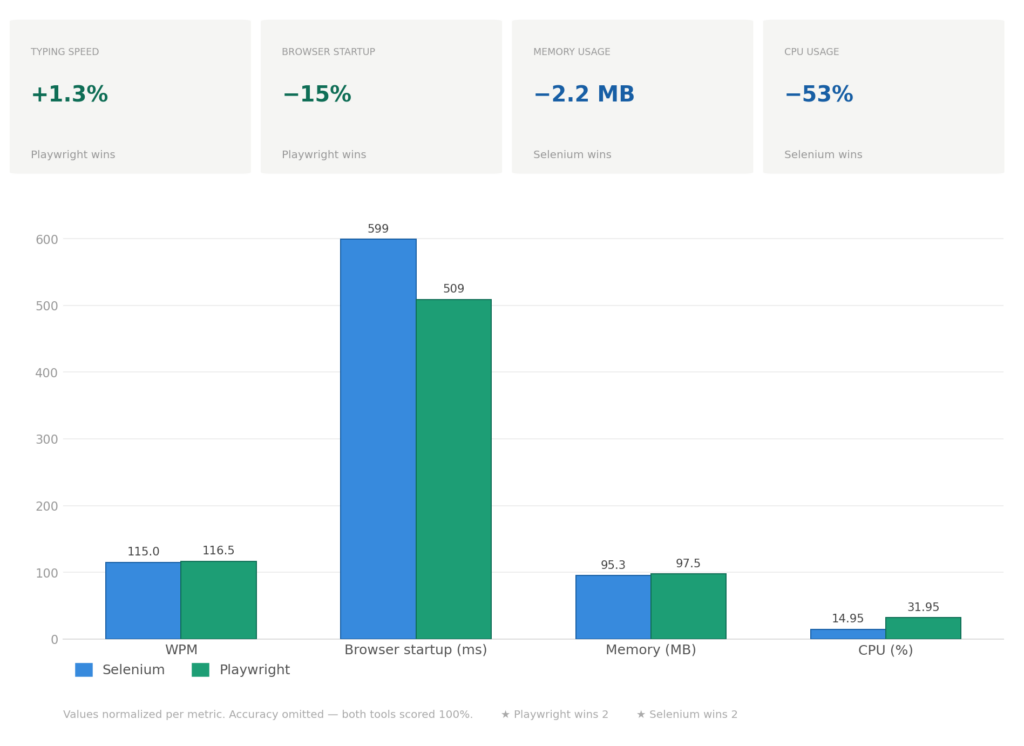
I ran both frameworks through the intermediate typing profile (100ms delay between keystrokes) with multiple test runs. Here are the aggregated results:
Breaking Down the Results
WPM (Words Per Minute)
Both frameworks achieve nearly identical typing performance. The 1.3% difference (115 vs 116.5 WPM) is within measurement variance and statistically insignificant. This confirms that the typing logic is the bottleneck, not the framework.
Accuracy
100% for both frameworks across all typing profiles. This destroys the outdated notion that “Selenium is flaky.” When properly implemented with explicit waits and correct selectors, both frameworks are equally reliable on complex production sites.
Browser Startup Time
Playwright initializes browsers 15% faster (509ms vs 599ms). This difference compounds in CI/CD pipelines. For a test suite with 1000 browser sessions, Playwright saves approximately 90 seconds of the total execution time. For single runs, the difference is negligible. For high-frequency testing, it’s significant.
Memory Usage
Virtually identical (95.3 MB vs 97.5 MB). The 2.2 MB difference is noise. Neither framework has a meaningful advantage in memory consumption for typical scenarios.
CPU Usage: Can Each Framework Efficiently Scale Across Multiple Cores?
Selenium uses 53% less CPU per test (14.95% vs 31.95%). But this number alone doesn’t answer the practical questions: Can the implementation facilitate the usage of multiple cores? Can it efficiently scale? Under which circumstances?
Browser Automation is I/O-Bound
Both frameworks spend 80-90% of execution time waiting for browsers: page loads, JavaScript rendering, and DOM updates. The framework only consumes CPU during active operations like clicking elements, typing text, or extracting data. This I/O-heavy nature fundamentally changes how each framework can utilize available cores.
Selenium uses ThreadPoolExecutor, which runs each test in a separate OS thread. When a test waits for a page to load, that thread blocks and does nothing. The lower CPU overhead (14.95%) looks efficient, but the thread sits idle during browser I/O waits. This model scales horizontally by spawning multiple processes, which works well in containerized environments where you distribute work across many lightweight containers.
Playwright uses async/await, which runs all tests in a single event loop with non-blocking I/O. While one test waits for a page load, the event loop switches to another test that needs CPU time. This results in higher CPU overhead (31.95%) because the event loop actively manages task switching, but it uses resources more efficiently during I/O-heavy operations. This model scales vertically within a single process, making it efficient on multi-core servers where you want to saturate available cores.
Scaling Beyond Small Numbers: What Happens at 50, 100, or 1000 Tests?
The architectural differences become more pronounced as the test count increases. On an 8-core machine:
Selenium’s horizontal scaling:
Running 10 tests might spawn 2-3 processes. Running 100 tests might spawn 10-20 processes across multiple cores. Each process maintains relatively low CPU usage (~15% per test), so you can pack many processes onto the same hardware before hitting CPU saturation. The bottleneck shifts from CPU to other resources, such as memory (each browser instance consumes RAM), file descriptors, or network connections. The scaling pattern is linear and predictable – double the tests, roughly double the processes.
Playwright’s vertical scaling:
Running 10 tests in a single process is efficient – the async event loop keeps cores busy during I/O waits. But at 50-100 tests, a single event loop starts hitting limits: event loop saturation. Even with non-blocking I/O, managing too many concurrent tasks in one event loop incurs overhead. At this point, Playwright also needs to scale horizontally by running multiple processes, but each process can handle more concurrent tests than Selenium due to async efficiency.
The practical implication:
Neither framework can run 100 tests in a single process on an 8-core machine without trade-offs. Selenium hits thread/process limits earlier, but each process is lighter. Playwright’s single process can handle more concurrency before needing horizontal scaling, but it needs multiple processes too. The difference is where the inflection point occurs – Playwright can handle higher concurrency per process before scaling horizontally becomes necessary.
Can They Scale? Yes – But Differently
Both frameworks can efficiently use multiple cores, but through different strategies:
Selenium facilitates multicore usage through horizontal scaling. It spawns multiple processes, each consuming around 15% CPU per test. On an 8-core machine, you can comfortably run many processes without saturation. This approach works exceptionally well when your infrastructure already favors process-based distribution (Kubernetes, Docker Swarm, CI/CD runners). If you’re running CPU-intensive processing alongside tests, Selenium’s lighter per-process footprint leaves more headroom on each core.
Playwright facilitates multicore usage through vertical scaling first, horizontal scaling second. A single process efficiently saturates multiple cores by keeping the event loop busy during I/O waits. On the same 8-core machine, async can handle more concurrent operations per process because it doesn’t waste cycles blocking. This approach excels when your workload is I/O-heavy (typical for browser automation), and you want maximum throughput per server instance.
Under Which Circumstances Does Each Approach Win?
The scalability advantage depends entirely on your deployment context and test volume:
Horizontal scaling (Selenium) works better when:
Your infrastructure already orchestrates many small containers or processes. Adding more parallel work means spinning up more instances, which container platforms handle naturally. Resource-constrained individual runners (2-core CI agents) benefit from lower per-process overhead. You’re running moderate concurrency (10-50 tests) where process overhead is manageable.
Vertical scaling (Playwright) works better when:
You have powerful multi-core servers and want to maximize utilization per instance. I/O-heavy workloads (which browser automation almost always is) benefit from async’s ability to keep all cores busy while tests wait for browser responses. You’re running high concurrency (50-200+ tests) where Playwright’s async efficiency delays the need for horizontal scaling.
The Real Insight
The 14.95% vs 31.95% CPU difference doesn’t tell you which framework scales better. It tells you which execution model is being used. Both can efficiently utilize multiple cores; the question is whether your infrastructure and workload characteristics align better with horizontal, process-based scaling or vertical, async-based scaling.
At a small scale (5-10 tests), the difference is negligible. At medium scale (50-100 tests), Playwright’s async efficiency provides better throughput per process. At a large scale (hundreds or thousands of tests), both require horizontal distribution across multiple machines, and the choice depends more on your orchestration platform than on the framework’s CPU overhead.
Don’t choose based on CPU percentage alone. Test both frameworks in your actual deployment environment and measure what matters: tests completed per minute under realistic concurrent load.
When to Choose Selenium
Selenium remains the right choice when:
You’re Running Tests in Parallel on Limited Resources
Selenium’s horizontal scaling model (multiple processes with lower per-process overhead) fits resource-constrained CI runners better. If your infrastructure already orchestrates many containers, Selenium’s process-based approach integrates naturally.
You Have an Existing Selenium Codebase
Migrating from Selenium to Playwright requires rewriting tests. If your team already knows Selenium patterns, the learning curve for Playwright doesn’t provide enough benefit unless you’re building something new.
You Need WebDriver Protocol Compatibility
Selenium uses the W3C WebDriver standard, which is supported by browsers, BrowserStack, Sauce Labs, and other cloud testing platforms. If you’re integrating with external services that expect WebDriver, Selenium is the path of least resistance.
Startup Time Isn’t Critical
If your tests run hourly or daily rather than on every commit, the 90ms startup difference doesn’t matter. Selenium’s mature ecosystem and proven stability are more valuable than marginal speed improvements.
When to Choose Playwright
Playwright is the better choice when:
Startup Speed Matters for Your Workflow
If you’re running tests on every pull request in CI/CD, faster browser initialization means faster feedback loops. The 15% reduction in startup time compounds across hundreds of daily test runs.
High Concurrency on Multi-Core Servers
Playwright’s async architecture efficiently utilizes multiple cores through vertical scaling. A single process can handle more concurrent I/O-bound operations because the event loop keeps cores busy while tests wait for browser responses. This makes it ideal for powerful multi-core test servers.
You’re Building Async-First Applications
Playwright integrates natively with async Python code. If your application already uses FastAPI, asyncio, or other async frameworks, Playwright eliminates the ThreadPoolExecutor complexity that Selenium requires.
You Want Modern Developer Experience
Playwright’s API is cleaner, more intuitive, and better documented than Selenium’s. Features like auto-waiting, network interception, and trace recording are first-class citizens, not third-party addons.
You’re Starting a New Project
If you’re building automation from scratch with no existing Selenium investment, Playwright’s modern architecture provides long-term advantages. The ecosystem is actively developed, and new features arrive faster than Selenium’s.
The Verdict: Choose Based on Your Constraints
After testing both frameworks under identical conditions on a complex production website, the conclusion is clear: there is no universal winner.
Playwright excels at startup speed and vertical scaling through async I/O efficiency.
Selenium excels at horizontal scaling and has a mature ecosystem with widespread support.
Both frameworks achieve 100% accuracy and nearly identical typing performance when the browser is the bottleneck. The decision comes down to your specific constraints:
• If you run many tests in parallel on limited hardware → Selenium’s horizontal scaling wins
• If you need fast feedback loops → Playwright’s startup speed wins
• If you have multi-core servers for I/O-heavy tests → Playwright’s async efficiency wins
• If you have existing Selenium code → Migration cost outweighs benefits
• If you’re building new automation → Playwright’s modern API is worth it
The most important insight from this project isn’t “Framework X is better than Framework Y.” It’s that both Selenium and Playwright are production-ready in 2026. The days of “Selenium is slow and flaky” are over. Choose based on your infrastructure, team experience, and performance priorities – not outdated assumptions.
Conclusion: Test on Real Websites, Not Toy Examples
This benchmark differs from typical framework comparisons because it tests on a real production website with actual complexity: dynamic DOM manipulation, cookie modals, JavaScript-heavy rendering, and complex keyboard event handling.
The results reveal that when the browser is the bottleneck, framework differences become marginal. Both Selenium and Playwright spend most of their time waiting for page loads, JavaScript execution, and network requests. The actual automation framework overhead accounts for a small fraction of total execution time.
The architecture choices mattered more than the framework choice. By defining a shared TypingDriver interface, implementing identical test workflows, and using the same resource monitoring, the benchmark isolated framework performance as the only variable. This approach provided fair, meaningful comparisons instead of apples-to-oranges benchmarks.
If you’re evaluating browser automation frameworks, don’t rely on synthetic benchmarks. Test both frameworks on your actual target websites, measure metrics that matter for your use case, and make decisions based on data rather than marketing claims.
The complete project is available on GitHub with Docker Compose setup, REST API, and full test implementations for both frameworks. You can run the exact same benchmarks on your own infrastructure and verify these results independently.


