




Yes, React Native is mature enough for enterprise development in 2026, although that doesn’t automatically make it the right choice for every application. React Native has changed a lot since its early years. The New Architecture is now mandatory, performance has improved, and React Native has been tested in large production applications. Yet questions around native development, platform compatibility, and long-term maintenance still matter when deciding whether to use it.
Key Takeaways:
- React Native has moved beyond its experimental phase. The New Architecture is now the only runtime architecture, while Hermes V1 and ongoing support for iOS and Android changes give teams a more predictable foundation for long-term development.
- Cross-platform doesn’t mean native-free. Performance-sensitive features, new platform capabilities, debugging, and some third-party dependencies can still require Swift, Kotlin, or other native work.
- Large applications don’t have to be entirely React Native. Discord, Shopify, and Meta show different ways to combine shared React Native code with platform-specific implementations where they make more technical sense.
- The main organizational advantage is reduced duplication. Companies can share more code, tooling, as well as engineering knowledge across both iOS and Android, although this doesn’t automatically mean a smaller or cheaper mobile team.
- Maturity doesn’t make React Native the right choice in every case. Shopify’s move back to native development in 2026 shows that the decision can change as product requirements, tooling, team structure, and development economics change.
What Does “Enterprise-Ready” Actually Mean?
Popularity can indicate a mature ecosystem, but it doesn’t necessarily mean that a technology is ready for enterprise use.
I’ve worked on products from initial development to deployment and long-term maintenance. For enterprise teams, it’s not enough for a technology to work well today. It also needs to remain predictable and manageable as the product evolves.
For React Native, we’ll look at six criteria:
- platform stability
- long-term maintainability
- ecosystem maturity
- performance and scalability
- native platform compatibility
- team scalability and hiring.
Does The New Architecture Give React Native A More Stable Foundation?
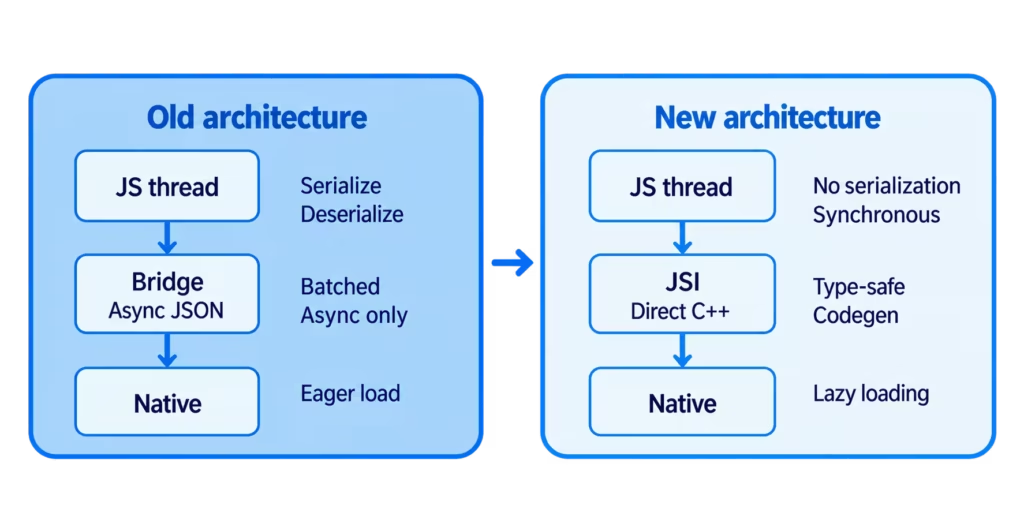
Many of React Native’s historical performance concerns were connected to its old architecture. Communication between JavaScript and native code relied on an asynchronous bridge and required data to be serialized, which could create bottlenecks.
React Native started addressing these limitations with the New Architecture. Introduced experimentally in version 0.68, it became the default in 0.76. Instead of relying on the bridge, it uses JSI (JavaScript Interface) for direct communication between JavaScript and native code, including synchronous calls where needed. Also, it introduced Fabric, a new rendering system with features such as synchronous layout measurements and automatic view flattening.
At first, the New Architecture was experimental for several releases before becoming the default in React Native 0.76 in 2024. With the release of 0.82 in October 2025, apps could no longer run on the Legacy Architecture.
Hermes V1 Improves JavaScript Performance
React Native’s JavaScript engine has also changed over time. Version 0.82 introduced experimental opt-in support for Hermes V1, an updated version of the JavaScript engine optimized for React Native.
The React Native team tested Hermes V1 on the Expensify app and reported improvements in bundle loading and time to interactive (TTI). The results were different between Android and iOS.
| Bundle Load Time | 3.2% faster | 9% faster |
| Total TTI | 7.6% faster | 2.5% faster |
| Content TTI | 7.2% faster | 7.5% faster |
With React Native 0.84 in February 2026, Hermes V1 became the default on both Android and iOS.
The important part for enterprise teams isn’t simply that React Native has a newer architecture. It’s what I mean by the platform stability criteria — or how the transition was handled. The New Architecture moved from an experimental option in 2022 to the only supported runtime architecture in 2025 rather than replacing the old architecture in a single release.
That gradual transition gave teams time to migrate while the new approach was tested in production. It also makes the framework’s direction more predictable. Companies starting or maintaining React Native applications today are no longer choosing between two architectures.
The New Architecture can also reduce some duplicated platform-specific work, although it doesn’t eliminate the need for native code. That matters for long-term maintenance and TCO when the same functionality would otherwise need separate implementations for iOS and Android.
Can React Native Keep Up With iOS and Android?
New SDKs are constantly being released for native platforms, and both platform and privacy requirements are changing. React Native may not support every new Android or iOS requirement immediately, but the framework is regularly updated to accommodate platform changes.
As an example, let’s take edge-to-edge behavior for apps targeting Android 16, where opting out is no longer possible. These apps run edge-to-edge by default, so your app’s content can render behind bars (status bar, navigation bar), requiring you to handle margins correctly. The built-in <SafeAreaView> component doesn’t solve this problem: it was iOS-only and is now deprecated.
React Native recommends react-native-safe-area-context for handling safe areas across platforms. The library also gives developers more control than simply adding margins.
Android 16 also enables predictive back gestures by default for apps targeting API 36. The current BackHandler API for React Native can handle this task, but thorough testing is required to ensure smooth animations and a native app experience. Working with the native side is also possible.
On the iOS side, Apple is also changing fundamental things, but not as drastically as it might seem. In iOS 26, a console warning indicates that UIScene lifecycle support will soon become mandatory. Starting with iOS 27, apps built with the latest SDK must adopt the scene-based lifecycle, or they won’t launch. UIApplicationDelegate remains, but UI lifecycle management moves to the scene level.
For React Native apps, this means a switch from the classic AppDelegate to a UIWindowSceneDelegate-based scenario and support for multi-window scenarios on iPad. The React Native team began laying the groundwork for this back in version 0.81, and work continues. For example, they’re currently finalizing certain edge cases, such as correctly handling screen rotation when using a custom SceneDelegate.
The examples can be summarized as follows:
| Android 16 edge-to-edge | Apps targeting API 36 run edge-to-edge by default, so teams need to account for content displayed behind system bars. |
| <SafeAreaView> deprecation | Teams need an alternative such as react-native-safe-area-context for cross-platform safe-area handling. |
| Android 16 predictive back | Back navigation and animations need to be tested against the new default behavior. |
| iOS scene-based lifecycle | React Native apps need to accommodate Apple’s move toward scene-based UI lifecycle management. |
As we can see, mature technology doesn’t mean that breaking changes will never happen. It means there’s a predictable path to handling them. For enterprise teams, this predictability is particularly important. React Native may not support every new iOS or Android requirement immediately, but it consistently adapts as official support is introduced.
This is how native platform compatibility and long-term maintainability work in practice: React Native responds to platform changes consistently, reducing the risk of prolonged disruption due to sudden incompatibility.
Can React Native Operate At Scale?
React Native can support large, long-lived mobile applications, although enterprise teams often combine it with native code for performance-critical or platform-specific functionality. Discord and Shopify are particularly useful examples because both have used React Native extensively while continuing to rely on native development where it made more sense.
How Discord Transitioned to React Native
Discord initially avoided React Native on Android because of performance concerns. But advances in Android device capabilities and the introduction of Hermes eventually changed that calculation, and the company transitioned its Android client to React Native in 2022.
Discord chose a hybrid approach. The team virtualized the server list in React Native, which reduced memory consumption and improved loading speeds for users with large numbers of servers. But when the Android emoji picker showed blank frames during fast scrolling, then the team rewrote the component natively. According to Discord, the chat list was also originally native, with JavaScript used only to retrieve message data.
Shopify’s React Native Journey
Shopify’s experience covers a much longer period. The company experimented with React Native in 2015 but decided against broad adoption because of performance limitations and the lack of first-class Android support. By 2020, those constraints had changed enough for Shopify to make React Native the foundation of its mobile development strategy.
For its largest application, Shopify used an approach called “iterative porting”. New features were implemented in React Native while existing functionality was migrated in parallel, which allowed product development to continue throughout the transition.
By 2025, Shopify described the migration as highly successful. Its React Native applications achieved P75 screen load times below 500 ms and more than 99.9% crash-free sessions. Swift and Kotlin still remained part of the stack for functionality that benefited from direct platform access, background processing, hardware integration, or other native capabilities.
In 2026, though, Shopify announced another change in direction: it would move its applications back to native Swift and Kotlin. The company did not describe its React Native strategy as a failure. Instead, advances in AI-assisted development had reduced the cost of implementing and maintaining equivalent functionality across two native platforms. This weakened one of the economic arguments for sharing most application code through React Native.
For enterprise teams, these examples demonstrate two things. First, React Native is technically capable of supporting large production applications. Second, the “right” technology choice can change as the business evolves. React Native may be the most suitable solution at one stage (e.g., when faster cross-platform delivery or hiring one team instead of two are priorities) and become less attractive later.
So, technology choices should therefore be evaluated in the context of the team, product requirements, available tooling, and the engineering environment at a particular point in time.
Where React Native Still Creates Engineering Overhead
React Native can remove a significant amount of duplicated application-layer work, but the underlying complexity of mobile development remains. As a product becomes larger or more specialized, teams need to know where React Native ends, and the native platforms begin.
Performance Still Requires Broader Optimization
Performance needs attention when an application becomes more demanding. Large lists, complex animations, frequent updates, memory-intensive operations, or high volumes of JavaScript-to-native communication may expose bottlenecks.
The New Architecture reduces some of the historical overhead through JSI, Fabric, and TurboModules, but performance still needs to be addressed at the application level. Teams may need to optimize rendering, use memoization and caching where appropriate, virtualize large lists, manage state carefully, and profile the application to find bottlenecks. Some demanding features may still be better implemented in native code.
Debugging Crosses the JavaScript and Native Layers
Finding the source of an issue can be more difficult in a React Native application. The problem may come from JavaScript, React Native itself, a third-party dependency, or the underlying iOS or Android implementation.
React Native DevTools can be used to inspect JavaScript execution, React components, logs, and performance. Xcode and Android Studio are still needed when the problem is on the native side. Native debugging therefore remains part of working with React Native.
Dependencies Become an Architectural Concern
Third-party libraries can become a risk when they are poorly maintained or lag behind React Native releases, especially if they don’t support the New Architecture yet. Enterprise teams should look at maintenance activity, release history, compatibility with current React Native versions, and how much native code a dependency introduces, not just the functionality it provides.
Framework upgrades are another ongoing task. New iOS and Android APIs, lifecycle changes, privacy requirements, and React Native releases can require updates to native dependencies and third-party libraries.
Some Functionality Still Belongs in Native Code
React Native does not expose every iOS and Android capability through JavaScript. Features such as advanced camera functionality, Bluetooth, AR/VR, or newly introduced platform APIs may still require native modules or components.
That doesn’t mean the whole application needs to be native. Teams can keep most of it cross-platform and use native code for the functionality that requires it.
The Learning Curve Extends Beyond React
React Native is relatively accessible to developers with a React background, and the official documentation includes a beginner-oriented tutorial covering the fundamentals from the ground up. But working on a large application eventually requires knowledge beyond React and TypeScript. Developers may need to understand platform behavior, native modules, build systems, application lifecycle, and differences between iOS and Android.
If this expertise isn’t available in-house, enterprises don’t need to spend resources on building it. Instead, they often choose to hire remote React Native developers with relevant large app development experience.
Building and Scaling a React Native Team
For enterprises, the question is not only whether React Native can support the application, but also how easily the organization can hire, onboard, and scale a team around it.
One of React Native’s main advantages is its overlap with the JavaScript and React ecosystem. Companies with existing React teams can transfer part of that knowledge to mobile development instead of building completely separate iOS and Android organizations from scratch.
This hybrid model gives companies more flexibility in both hiring and team structure. Instead of recruiting only experienced React Native developers, organizations can also train React, JavaScript, TypeScript, or native mobile engineers in the parts of the stack they are missing. At the same time, much of the product logic, architecture, testing strategy, and tooling can be shared across platforms.
As teams grow, this can help reduce duplicated work and make engineering capacity easier to distribute between both iOS and Android. Platform-specific files and APIs can keep native differences isolated instead of requiring separate implementations of the entire application.
The result is not automatically a smaller or cheaper engineering organization. Large React Native applications still benefit from strong mobile expertise, and specialized features may require dedicated native engineers. The main advantage is reduced duplication. More engineering effort can go into a shared product layer across both platforms.
So, Is React Native Mature Enough for the Enterprise in 2026?
I would say yes. React Native has been used in production for years. Its ecosystem is well established, and the New Architecture gives teams a more stable foundation to build on. Native functionality can still be added when the cross-platform layer isn’t enough.
That doesn’t remove the tradeoffs. Teams still have to deal with platform updates and dependencies, and some features need more performance work or native expertise.
React Native makes the most sense when an application needs to run on both iOS and Android and much of its functionality can be shared between them. The case becomes weaker if the product relies heavily on platform-specific capabilities or needs new native APIs as soon as they are released.
The more useful question for an enterprise team is therefore not simply whether React Native is mature enough. It’s whether the advantages of sharing development across platforms outweigh the native complexity the product still requires.
React Native is mature enough for enterprise development in 2026, although it won’t suit every product. The framework now has a more stable architecture, a well-established ecosystem, and a long track record in large production applications. Teams still need to deal with platform updates, performance-sensitive features, third-party dependencies, and functionality that is better implemented natively.
How much code you can actually share between iOS and Android matters here. If most of the application can remain cross-platform, React Native has a clear practical advantage. That advantage starts to shrink when native functionality accounts for a large part of the product.
TL;DR
React Native is mature enough for enterprise development in 2026, although it won’t suit every product. The framework now has a more stable architecture, a well-established ecosystem, and a long track record in large production applications, including Discord, Meta, and Shopify, which used React Native as its core mobile application development strategy from 2020 till 2026. Teams still need to deal with platform updates, performance-sensitive features, third-party dependencies, and functionality that is better implemented natively.
How much code you can actually share between iOS and Android matters here. If most of the application can remain cross-platform, React Native has a clear practical advantage. That advantage starts to shrink when native functionality accounts for a large part of the product.


