



Currently, when discussing the topic of agentic engineering and, in particular, AI-assisted code review, people generally fall into two camps. Some argue that reading every change made by AI agents slows down development. Others are unwilling to trust agents because of their errors and superficial solutions.
This raises two questions: “Do we still need to read the code?” and “Do I need to read the code by myself?” My answer is yes, but the depth of the review depends on the situation and context. What matters most isn’t the number of lines reviewed, but rather the risks associated with the changes and the quality of the review.
In this article, I suggest an approach to AI-assisted code review that involves assessing the risks associated with possible errors, preparing changes for review, and using AI agents to collect evidence, such as tests, logs, execution results, and visual confirmations.
Why Traditional Code Review Isn’t Enough
Let’s consider a typical situation where a single developer uses multiple agents simultaneously – for example, one implements functionality, a second one writes tests, and a third one performs refactoring. As a result, the volume of changes grows faster than the time available to review them in detail.
But the typical review cycle remains the same:
planning → implementation → review → deployment
The only thing that changes is which part of the work can be delegated to an agent and which aspects must remain in human hands. If we speed up code generation without changing how we verify it, the bottleneck will shift to code review.
And here, instead of asking “How many lines do I need to check?, start with the following questions:
- What has changed?
- Which parts of the system depend on this change?
- What evidence will confirm correct behavior?
How to Determine the Review Depth
When deciding on a review depth, consider two factors: how widely an error could spread and how serious its consequences would be.
To better understand the process going forward, I suggest thinking of the codebase as a single tree consisting of roots, a trunk, branches, and leaves. Some parts are common and support most of the application (the trunk and roots), while others are more isolated (the leaves).
In a React application, the “trunk” might be a shared state or the authorization infrastructure, the “branches” could be services and API modules, and the “leaves” could be local UI components.
- Trunk – Authorization, shared state, common contracts.
Deep read: Carefully examine diffs, dependencies, negative scenarios, and regressions.
- Branch – API module, service, connecting business flow.
Careful review: Check boundaries, contracts, side effects, and integration tests.
- Leaf – Local UI, feature-flagged component.
Proof-led review: Rely on unit tests and a working demo with selective diff review.
So, the more important a detail is, the more thoroughly and diligently you need to test it.
For example, changing a shared reducer can affect multiple screens. But updating a local presentation component that doesn’t involve data or access permissions is usually easier to verify using focused tests and visual comparisons.
However, isolation alone doesn’t necessarily mean low risk. Take a small endpoint. It might process personal data or check permissions, so it requires careful analysis.
Plan Changes So They Can Be Verified
To make AI-generated changes easier to review, start planning the agent involvement even before creating a pull request. If the task scope is unclear, the agent is more likely to affect unnecessary files, making it more difficult for the reviewer to understand the scope of the changes.
Before implementation, take the following steps:
- Define the goal: what problem the change solves and what behavior should remain unchanged.
- Isolate the implementation and consider the integration points separately: state, dependencies, API contracts, and user scenarios.
- Agree on a work plan, acceptance criteria, and verification methods with the agent before it begins modifying the code.
When appropriate, hide the new functionality behind a feature flag and integrate it in stages. Feature gating allows you to enable or disable new functionality without a full release rollback. This is especially useful for high-risk user flows, gradual rollouts, and A/B tests.
However, feature flags do not replace security checks, and rolling back code does not always undo data changes or database migrations.
The main goal is to make new functionality as observable and reversible as possible, rather than simply reducing the size of the diff.
How Agentic Validation Works
Just because an agent completes the implementation and reports success, it doesn’t necessarily mean that’s the case. To be confident in the changes, we need evidence, specifically:
- What was tested
- How it was tested
- What results were obtained
This process can be called “agentic validation” – the use of agents to perform tests and gather evidence for review.
Different types of evidence confirm different aspects of the implementation, with each having its limitations.
| Evidence type | Helps confirm | Does not guarantee |
| Focused tests | Expected behavior of functions and regression for known scenarios | Completeness of business requirements and the absence of unresolved defects |
| Runtime / E2E | User flow in a live system | Proper functioning of all scripts, environments, and integrations |
| Screenshot / video | The visual appearance of the UI and specific interaction steps | Data accuracy, security, and behavior outside the specified path |
| Logs / CI report | Which commands were run, which ones completed successfully, and where errors occurred | No useless tests or missed checks |
Automated checks also require review. If an agent has written the implementation and tests based on an incorrect interpretation of the task, the tests may pass, but the actual requirement will not be validated.
Practical Examples
Preparing an AI-Generated PR for a Review
I created a small example in a training project so you can see how to interact with the agent to make the PR it creates as easy as possible for a human to review.
I asked the agent to describe the changes, outline the steps for manual review, suggest useful approaches, and provide visual confirmation (a short video or a screenshot).
This allows you, as a reviewer, to see not only the diff but also a visual representation of the expected outcome. This increases confidence in the solution because you can immediately see what it looks like and get a schematic overview of the changes in the code.
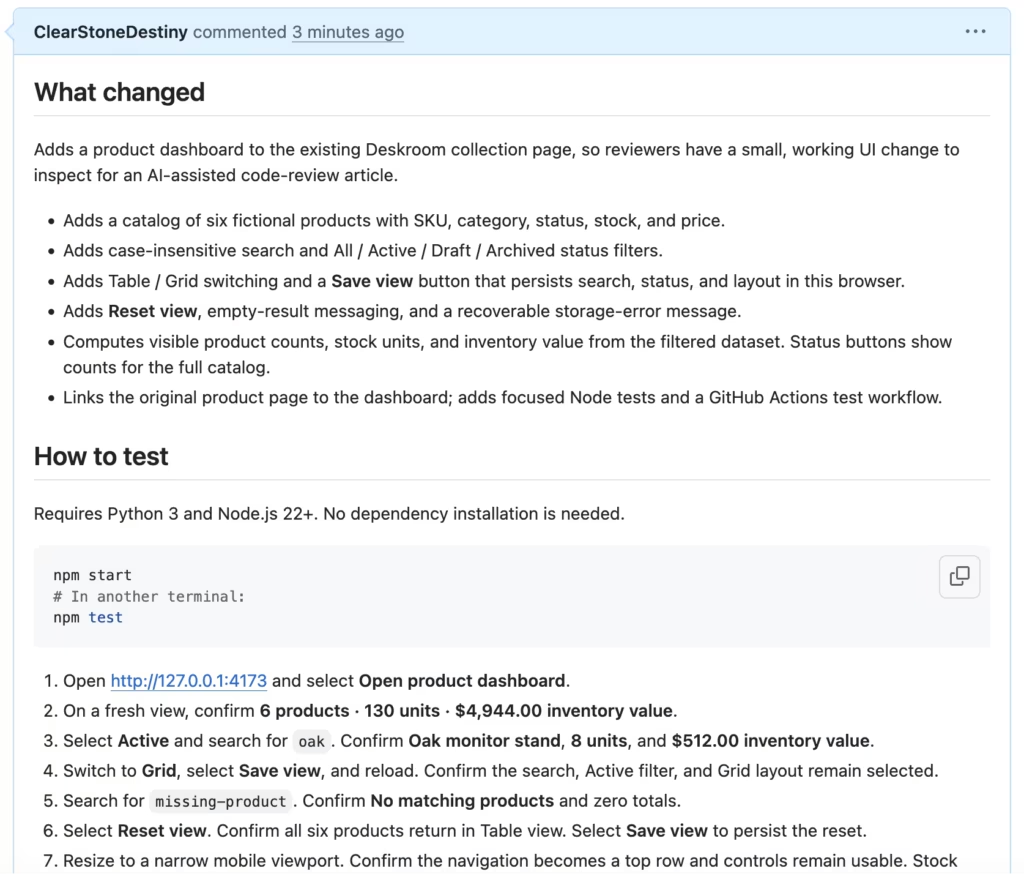
In this example, the agent prepared a PR description covering the implemented functionality and instructions for verifying it. The testing steps include:
- Running the application and automated tests.
- Checking the initial product counts and inventory values.
- Verifying search and status filters.
- Testing whether saved view preferences persist after reloading.
- Checking empty-result handling and resetting the view.
- Verifying usability on a narrow mobile viewport.
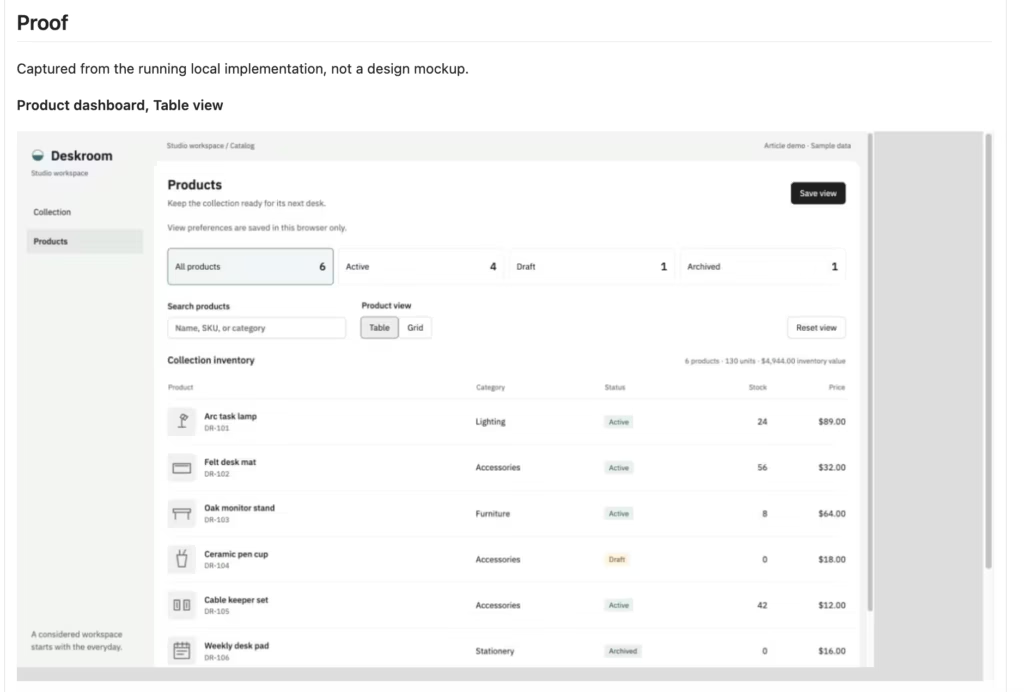
From my experience, I can say that these kinds of PRs are easier to review. It’s easy to reproduce the scenario, see the result, compare it to the requirements, and then move on to the particularly important parts of the code.
When a Code Change Requires Deeper Analysis
As another example, let’s consider a situation where the code warrants a closer look. Take the reducer that manages filters and saved dashboard settings. One of its transitions looks like this:
case "view/saved":
  // Record the snapshot that was persisted, not any newer edits.
  return {
    ...state,
    savedPreferences: action.preferences,
    saveStatus: "saved",
};You might ask why it’s important to check the logic carefully here. Imagine a user changes the filters on the dashboard and clicks “Save View.” While the save request is being processed, the user continues working and changes the filters again.
When the server confirms that the changes have been successfully saved, the reducer must update `savedPreferences` with the exact settings that were sent to the server, not the current filter values. Otherwise, the app might mistakenly consider changes made by the user after clicking “Save view” to be saved.
This is precisely why, during a review, it’s not enough to simply verify that the reducer correctly handles `view/saved`. It’s also necessary to trace the entire sequence of actions: which settings are sent to the server, what happens if the user changes them during the request, and how the app updates its state after receiving the response.
Such scenarios require a deep read. A single state transition may appear completely correct, but without understanding how it interacts with the rest of the application’s logic, it’s easy to overlook an error that will only manifest itself under a specific sequence of user actions.
Why Use an Independent AI Reviewer?
Use a separate AI agent for code reviews – the one that wasn’t involved in the implementation – because it brings a fresh context and may be better positioned to identify mistakes that the original agent could overlook.
You can assign a separate code review agent, use review skills and plugins from OpenAI or Claude, or create your own.
If you use an agent for review, it’s good practice to have a template in the repository that the agent can follow. For example, the template can cover:
Why
What problem does this solve?
What changed
- Describe the smallest useful change.
- Call out anything intentionally left unchanged.
Validation and proof
- Focused tests pass
- Existing control behavior is covered
- UI proof is attached when relevant
- A fresh reviewer or agent reviewed the diff
Another approach is to set a goal for the agent, where it periodically returns to the PR – say, once an hour – to rerun the checks and suggest fixes.
However, the automatic cycle of “found a problem → fixed it → checked again” must have limits; otherwise, it could endlessly cycle through solutions or introduce new regressions. The developer in charge makes the final decision on whether to accept the changes.
Merge-Ready Doesn’t Mean Launch-Ready
A PR with a green CI, reproducible test cases, and an independent AI review may be ready for merging, but it’s not yet ready for a mass rollout. At this stage, I recommend testing the functionality as a whole, rather than just individual diffs. It’s important for us to cover all of the following points:
- Correctness: edge cases, errors, repeated requests, recovery from failures
- User scenarios: primary and alternative paths, accessibility, behavior on different devices
- Performance: slow operations, unnecessary requests, large lists, load
- Security: access rights, input validation, sensitive information, third-party dependencies
I consider merge-readiness to be about 80% of the task complete, with the most challenging 20% still ahead. At this stage, we should no longer review individual changes but rather look at the feature as a whole. The final 20% will take quite some time, as it requires significant human input to review, refactor, and clean up the code.
For new and potentially risky features, a good practice is a limited rollout: enable the feature for a small group of users, monitor errors and metrics, and then expand access. At the same time, the plan for disabling the feature and the rollback procedure must be thought out in advance, especially if the change affects data or external systems.
What Should Developers Review Before Approving a PR?
To answer the questions posed at the beginning: yes, I still read code, and I recommend that you do the same. However, it’s critical to review it thoughtfully. The higher the risk of change, the more thoroughly you need to examine the architecture, runtime conditions, access rights, and error handling. For isolated and easily reversible changes, you can focus more on a working demo and unit tests, which will allow you to move fairly quickly on implementing isolated changes.
Before approving a PR, I’d suggest you ask yourself four key questions:
- What exactly has changed?
- What was supposed to remain unchanged?
- How far could a bug spread, and how will we detect it?
- Can we safely disable the change or roll it back?
AI agents help gather evidence faster and make the review process more systematic. But they don’t relieve the team of responsibility for requirements, architectural decisions, and release quality. The better you understand and are familiar with your codebase, the more accurately you can determine where a proof-led review is sufficient and where an in-depth code analysis is necessary.
If you seek to adopt safe, AI-assisted coding practices across your team, SysGears can help you. Let’s discuss your needs today.


