




Adding an AI image analysis feature to an app can be surprisingly easy: send an image to an API, as for the information you need, and process the response. The harder part is to make it reliable for users under real-world scenarios. Once you move beyond demo, the model choice, costs, output structure, accuracy, latency, and privacy become essential.
This article outlines the main ways to integrate AI-powered image analysis into applications and key challenges that arise before and during integration, and how the process works in practice through a case study.
Key takeaways:
- Choose the approach by use case: specialized vision services for narrow tasks, multimodal LLMs for flexibility, self-hosted models for stricter data control.
- Anticipate failures such as large images, rate limits, and model changes.
- Structured output doesn’t guarantee its correctness, so model responses still need validation.
- Keep deterministic logic outside the model where possible, especially validation, trusted lookups, and calculations.
What Is an AI Image Analyzer API?
An AI Image Analyzer API is a cloud service you plug into your app so it can look at a picture and tell you what’s in it – recognize objects, read text, describe a scene – without building or training your own computer vision model. In practice, it’s a tool for pulling information out of visual input: photos, screenshots, scanned documents, sometimes charts. I think of it as outsourcing the “looking,” the same way an OCR library outsources the “reading”: you’re buying a capability, not renting a data scientist.
The Three Ways to Integrate an AI Image Analysis API into Your App
Image analysis APIs generally fall into two categories, plus a third option worth considering in specific cases.
Vision Through General-Purpose LLMs
The first category includes vision through general-purpose LLMs – OpenAI’s GPT, , Anthropic’s Claude and Google’s Gemini models. You describe what you want in a prompt, and the same API handles wildly different tasks with no separate integration per task. The cost is that you’re running a full language model just to look at a picture. The responses take a few seconds rather than milliseconds, and pricing reflects that as well.
Specialized Vision Services
The second category is specialized vision services – AWS Rekognition, Google Cloud Vision, and Azure Vision. They are built for more specialized tasks like object detection, OCR, and face recognition. They usually respond in under a second. Some let you fine-tune on your own labeled images or return a confidence score per detection, which is handy if you want to auto-approve confident results and route the rest to a human. They’re generally faster and cheaper at scale, but each one only does what it was built for. Staying inside your existing cloud usually means less setup around auth and billing.
Self-Hosted, Open-Source Models
The third path is self-hosted, open-source models – YOLO variants for detection, open vision-language models, and CLIP-based embeddings for similarity search. This approach is rarely a starting point because it requires owning your own inference infrastructure. But if a photo can’t leave your servers at all, self-hosting is often the only real option, not just a cheaper one.
A key takeaway: If the task is narrow and well-defined, say OCR or object detection, a specialized service is usually simpler and cheaper. If you need flexibility, or the task requires understanding context, go with an LLM. If keeping photos off third-party servers isn’t negotiable, it’s worth pricing out self-hosting before committing to either.
How an AI Image Analyzer Works
Strip away the provider differences and, in my experience, most image analyzer APIs follow roughly the same flow:
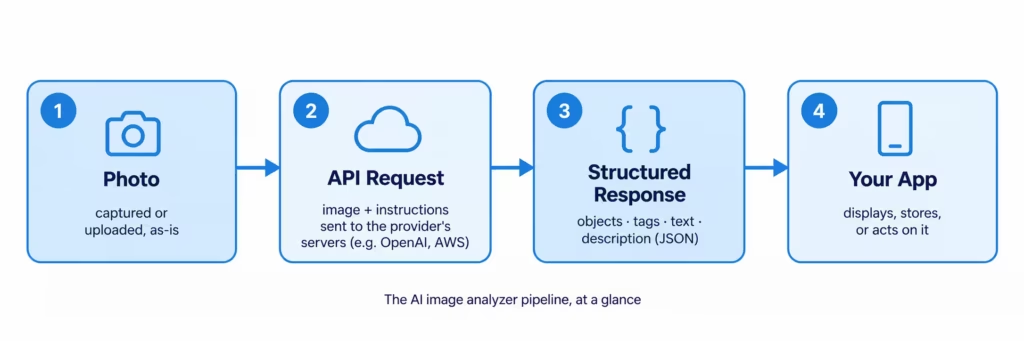
- Photo – whatever the user captures or uploads, as-is: an image, screenshot, scan, etc.
- API request – an image (usually base64 or a hosted URL) plus instructions: a prompt for the LLM route, or feature flags like “detect objects” for the specialized-service route. This runs on the provider’s servers, not yours.
- Structured response – JSON comes back, not prose: objects, tags, extracted text, or a description, depending on what was requested.
- Your app – does something with that JSON: renders it, saves it, or feeds the next step of a workflow, which is what the Eatsy case study below actually does.
Most of the actual engineering lives in steps 2 and 3, defining exactly what you want your model to return and making sure the response is reliable and structured enough for your code to handle safely.
How AI Image Analysis Creates Business Value
Adding image understanding to a product usually does one of two things, and I’ve seen both play out. Sometimes it replaces manual work, such as labeling product images. It can also enable brand new features that rely on image understanding.
Because the underlying capability is so general – essentially, “look at this and tell me something useful” – AI-powered image analysis can support various use cases across e-commerce, healthcare, logistics, accessibility, security, and other domains Users get something out of it too: snap a photo instead of filling out a form or search by image instead of guessing the right keywords.
Common AI Image Analysis Use Cases
| Use case | How AI image analysis is applied | Value |
| Ecommerce | Automatically tags product images and enables search by photo (like Google Lens or Pinterest’s visual search). | Reduces manual catalog work and helps shoppers find products that are difficult to describe with keywords. |
| Health / nutrition-tech | Allows the user to point a camera at the plate instead of searching a database for every ingredient. | Improves user experience for nutrition apps. |
| Content moderation | An automated check with a confidence score lets the system approve the obvious cases and only route unclear ones for a human review. | Helps platforms process large volumes of content without relying entirely on manual moderation. |
| OCR / document processing | Extracts fields such as vendor, date, and amount from an invoice or receipt scan. | Removes the need to type each field manually, while keeping a human in the loop. |
| Accessibility | Generates image descriptions and alt texts automatically. | Helps make visual content accessible to screen-reader users while reducing manual content management effort. |
Key Considerations While Integrating AI Image Analyzer Into Your App
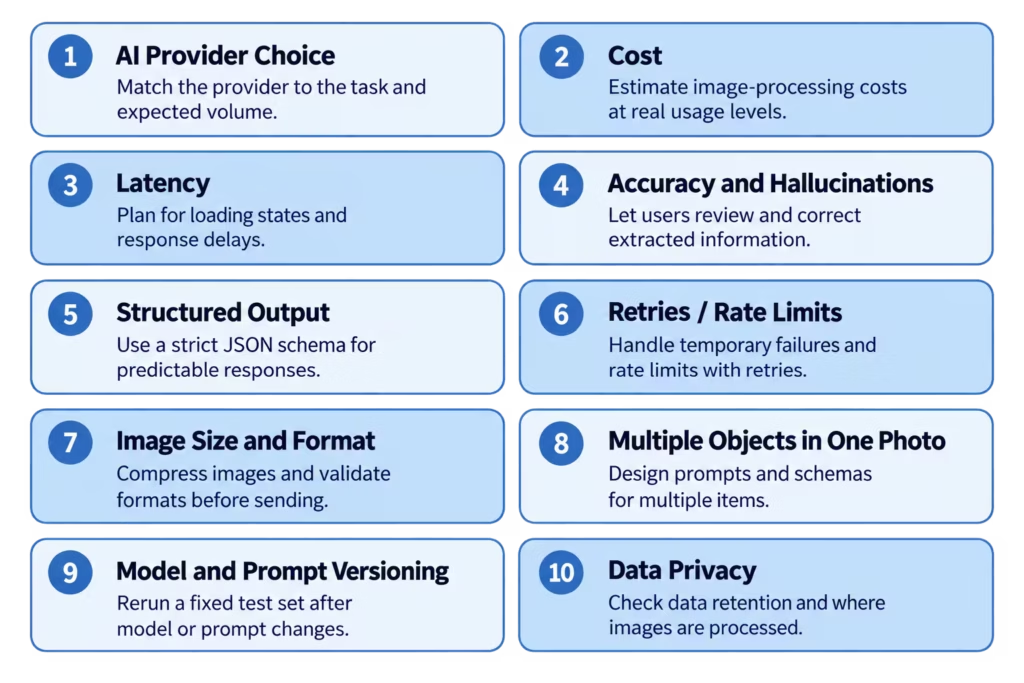
These are the challenges I either got warned about or learned the hard way while building the case study below. None of them are exotic – they’re simply part of moving an AI image analysis feature from a demo to production.
Choosing the Right AI Provider
Defaulting to whatever LLM is already wired into the app may be an expensive mistake. Specialized services may handle narrow tasks like object detection or OCR more efficiently and at a fraction of the price. The mismatch doesn’t show up until volume makes the cost gap obvious.
Cost at Scale
Vision calls aren’t priced like text calls; one image can cost several times more per request, and the exact multiplier shifts with the model, image size, detail level, and output length. It’s easy to miss with a dozen test photos, but becomes material once users are uploading daily.
Latency Influencing User Experience
Image analysis often takes seconds rather than milliseconds. Build the UI assuming instant response and skip the loading state, and users will think the app froze.
Accuracy and Hallucinations
A model can be confidently wrong about a value, and nothing in the response format flags it. Without a way for the user to catch and fix that, it just gets logged as fact.
Structured Output
Regex-parsing free text works in testing, then breaks the first time the model wraps the answer in a sentence. Most providers now offer a strict JSON schema mode for this exact reason.
Retries and Rate Limits
A 429 or a dropped connection is routine at real volume. Without a retry, a request that would’ve succeeded a second later just fails.
Image Size and Format
A phone photo can be 15-20MB. Sent as-is, that’s a slow, expensive request; sent in an unsupported format, it fails outright. Compress and check format before the image goes anywhere.
Multiple Objects in One Photo
A shelf with ten products, a receipt with a dozen line items: a prompt and schema built for one clean subject won’t survive contact with either. Design for it from the start rather than retrofitting it.
Model and Prompt Versioning
Providers update model behavior under the same model name, and a prompt tuned against one version can quietly degrade against the next. I don’t have a mature answer for this beyond the obvious one: keep a small, fixed set of test photos with known-good expected output and rerun them whenever you modify the prompt or the provider ships an update.
Data Privacy
Once a photo leaves the app it’s sitting on someone else’s servers for however long they keep it. Worth knowing before shipping, not after a GDPR review flags it – and worth weighing against the self-hosting option I mentioned earlier if that’s a hard constraint rather than a preference.
AI Image Analysis Feature in Practice: The Eatsy Case Study
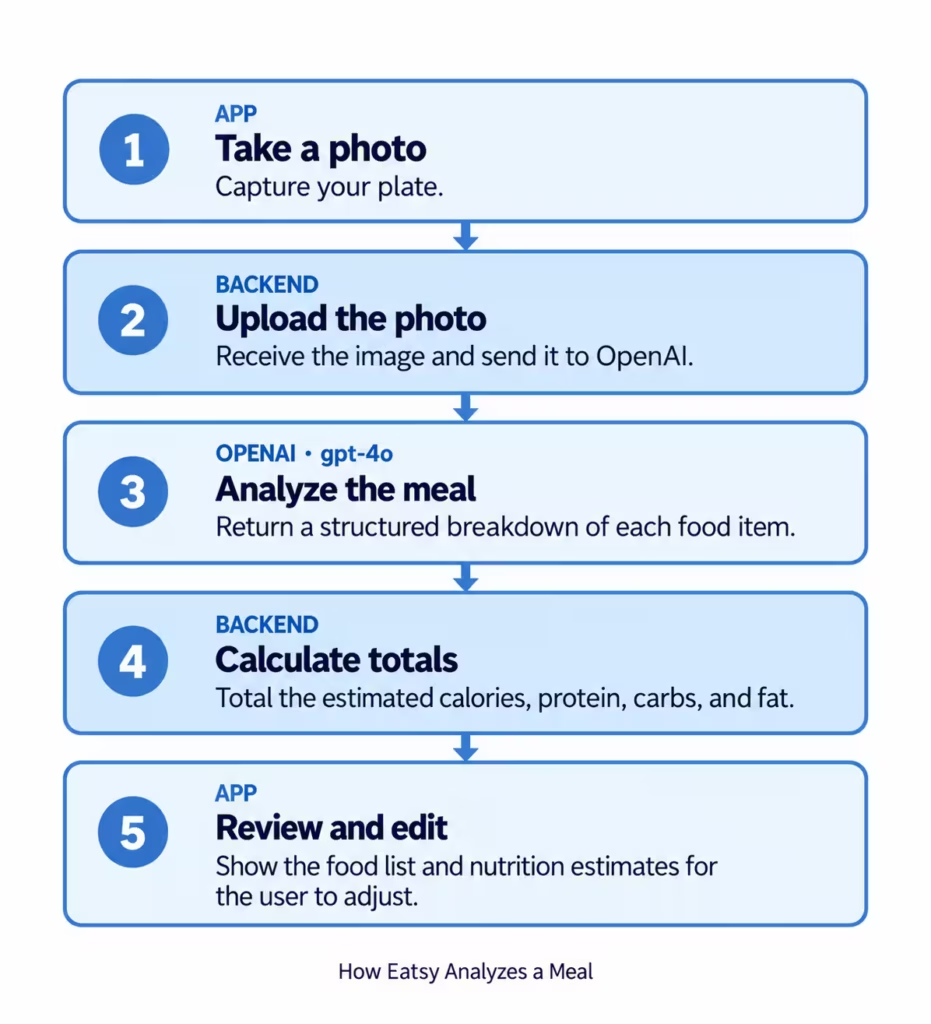
Eatsy is a small mobile app for tracking calories and macros that I mostly built to actually work with a vision API hands-on instead of just reading about it. The feature that taught me the most: point your camera at your plate, and the app tells you what’s on it and roughly how many calories it adds up to.
Here’s how it works: the phone uploads a photo to the backend, which sends it to OpenAI’s `gpt-4o` and asks for a structured breakdown of every food item on the plate, then totals the calories and macros before sending an editable list back to the app.
Sending the Request
The following two code blocks are the actual backend code. The photo comes in as a buffer, gets encoded as base64, and goes to OpenAI with a prompt asking it to list every item separately – sauces and sides included, not just the main dish:
onst base64Image = imageBuffer.toString("base64");
const dataUrl = `data:${mimeType};base64,${base64Image}`;


const parsed = await createStructuredCompletion<{ items: FoodItem[] }>(this.openai, {
 model: "gpt-4o",
 messages: [
   { role: "system", content: "...identify EACH separate food item... be thorough, list sauces, sides, garnishes separately..." },
   { role: "user", content: [{ type: "image_url", image_url: { url: dataUrl } }] },
 ],
 response_format: {
   type: "json_schema",
   json_schema: { name: "food_photo_analysis", strict: true, schema: PHOTO_ANALYSIS_SCHEMA },
 },
});That `response_format` block is the structured-output piece I mentioned above, and the schema behind it is what actually does the guaranteeing:
const FOOD_ITEM_SCHEMA = {
 type: "object",
 properties: {
   name: { type: "string" }, weight: { type: "number" }, unit: { type: "string" },
   calories: { type: "number" }, protein: { type: "number" }, fat: { type: "number" }, carbs: { type: "number" },
 },
 required: ["name", "weight", "unit", "calories", "protein", "fat", "carbs"],
 additionalProperties: false,
};`additionalProperties: false` plus a full `required` list is what “strict” actually means here – the model can’t omit a field or invent a new one. `PHOTO_ANALYSIS_SCHEMA` just wraps this in `{ items: [FOOD_ITEM_SCHEMA] }`, since a photo is rarely one item.
Making Sense of What Comes Back
The schema guarantees shape – every field will be present and be of the right type – but it doesn’t guarantee the values are sane. The model can still hand back a negative number, a `NaN`, or an empty name string, so sanitizing is a separate step from parsing:
function sanitizeAmount(value: number): number {
 return Number.isFinite(value) && value > 0 ? value : 0;
}


function sanitizeFoodItem(item: FoodItem): FoodItem {
 return {
   name: typeof item.name === "string" && item.name.trim() ? item.name.trim() : "Unknown item",
   weight: sanitizeAmount(item.weight),
   unit: item.unit || "g",
   calories: sanitizeAmount(item.calories),
   protein: sanitizeAmount(item.protein),
   fat: sanitizeAmount(item.fat),
   carbs: sanitizeAmount(item.carbs),
 };
}Once every item is clean, totaling calories, protein, fat, and carbs across the plate is a one-line reduction per field.
It’s worth being precise about what this step catches and what it doesn’t. It catches malformed values such as `NaN`, a negative number, or a blank name. But it can’t detect values that are well-formed but wrong, like the two mistakes further down. Sanitization is a floor, not a correctness check.
`createStructuredCompletion` is the shared utility both this call and the manual nutrition-lookup fallback go through, and it does more than “retry on failure.” Strict schema mode guarantees shape only if the response finishes – if the model runs out of tokens mid-array, you get JSON that parses to something *shaped* right but is missing items, or doesn’t parse at all. So it checks `finish_reason` for truncation explicitly, and retries a `SyntaxError` from a failed `JSON.parse` the same as it retries a dropped connection or a 429 – with exponential backoff and jitter, against a fixed set of retryable status codes (`408, 409, 429, 500, 502, 503, 504`) rather than a blanket “retry on anything”:
if (choice.finish_reason === "length") {
 throw new Error("OpenAI response was truncated before completing the JSON output");
}
return JSON.parse(content) as T;
// ...on catch: retry APIConnectionError, retryable status codes, and SyntaxError —
// a response that fails JSON.parse despite strict mode is worth one retry too.It wasn’t slow or expensive, either. Across the real photos I tested it on, responses came back in 2.7-4.7 seconds and cost $0.003-$0.005 per photo at the time of testing – well under a cent even with a fairly detailed prompt. That is a useful early signal, not a benchmark; both numbers need re-measuring against production traffic, current pricing, and a more representative set of photos.
The Reasoning Behind the Choices
Multiple items per photo wasn’t something I bolted on later – the prompt asks for every item separately from day one, because a plate with five things on it is the normal case. I went with base64 over file storage because this is one photo, sent once, never needed again – setting up a CDN just to pass it through would be overkill.
I did consider training a custom vision model on labeled food photos instead of calling GPT-4o. That’s weeks of work and thousands of labeled images before you even have a working prototype; wiring up an existing API took an afternoon, and the accuracy was already close enough to be useful for a personal project logging its own meals – not a bar I’d claim clears for a clinical or regulated use case. A custom model would only make sense if I needed to scale this, control costs at volume, or if that higher accuracy bar actually mattered – not for an experiment.
And that’s really what this was: I wanted to see firsthand how a general-purpose model handles something as messy as a real plate of food, not just read about it in the docs.
Where It Still Gets Things Wrong
I almost missed this one myself: the model got the ingredient right and the weight right and the per-gram value right – and still returned a number that only made sense if you ignored the weight entirely. It’s not the kind of failure you’d expect, and nothing about the response flagged it as broken – which is exactly why it needs a human check before it’s trusted.
A different kind of miss showed up with cottage cheese mixed with yogurt: it came back as just “cottage cheese.” No yogurt anywhere in the response – not a wrong guess, just gone. Once two things blend into one texture, the model can only tell you about what it can actually see.
Nothing in Eatsy gets saved automatically because of exactly this – two different ways the same output can look complete and be wrong. Every number the model returns is editable before it’s logged – I’ve watched it be confidently wrong in ways I wouldn’t have caught from a glance at the total.
The larger lesson was to separate visual interpretation from deterministic calculation. A stronger version of this flow would use the model to identify foods and estimate portions, look up nutrition in a trusted database, and calculate totals in application code – that reduces the number of facts the model has to get right in a single response.
To Conclude
The API call itself is the easy part – a handful of lines to send an image and get a structured answer back. What determines whether the feature actually works is everything around that call: picking the right model for the task, planning for requests that fail or come back wrong, and never treating the output as fact without a way to check it. My experience with meal recognition made that boundary concrete: use the model for uncertain visual interpretation, and keep validation, trusted lookups, and calculations in systems you can test. Budget for the boring parts because they’re the parts that actually ship.
Check our blog to read more insights from our experts, or explore our services if you’re looking for an AI-powered software development vendor.


